June 13, 2026 · 9:16 AM
sshelf: keep all your SSH hosts one fuzzy-search away
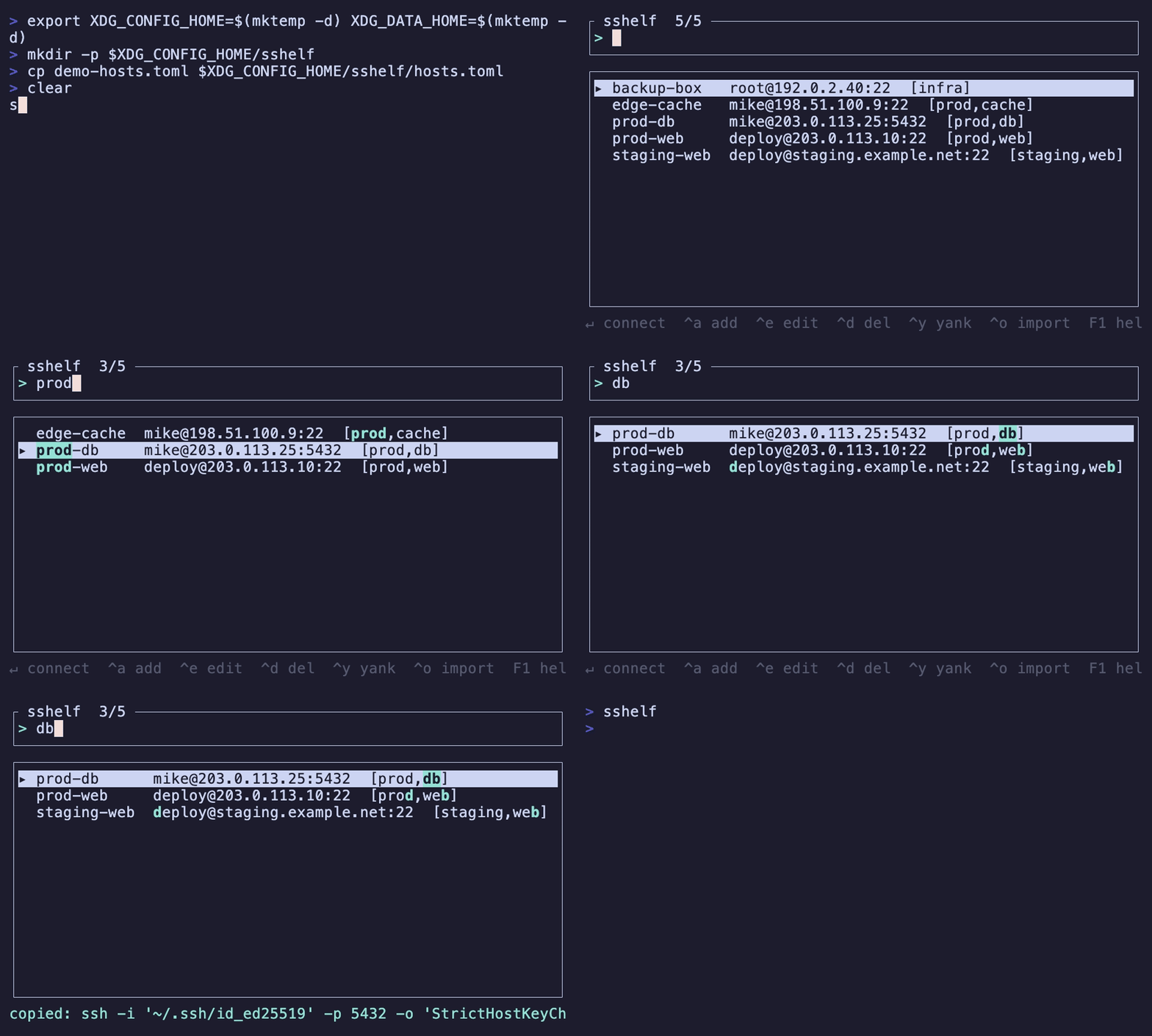
sshelf (Rust, MIT/Apache-2.0, v0.2.0, 33★) is a terminal UI for managing SSH hosts — fuzzy-search to filter, Enter to connect. It maintains its own database and generates ssh commands rather than reading or writing ~/.ssh/config, keeping it decoupled from Ansible and other tooling that touches that file. Supports tag filtering, jump-host chains, frecency sorting, and OS-keychain password autofill. Gained +8 stars in 24 hours with active community PR contributions.

You have forty SSH hosts. Prod cluster nodes, staging boxes, a handful of legacy gear, three jump hosts you can never quite remember the right sequence for. They're all in
~/.ssh/config — which Ansible also writes, your team's shared tooling also reads, and you're not supposed to touch by hand. So when you need to get onto prod-db-07, you tab-complete into the config, visually scan past twelve similarly-named entries, copy the hostname, and finally run the command. Every time.sshelf treats this as a solved problem: add a host once, fuzzy-search it later, press Enter to connect. 1
Loading content card…
The author, max-rh, described the motivation directly: "Built this after one too many 'which key/port/jump host was that again' moments across prod, staging, and a stack of legacy gear." 2 And the design summary: "It's k9s-style but for ssh: hosts saved once, fuzzy-search, enter to connect." 2
MIT OR Apache-2.0. v0.2.0, released 2026-06-07. Written in Rust, using ratatui and clap. 3
The key architectural decision
sshelf maintains its own database and generates the correct
ssh commands rather than reading from or writing to ~/.ssh/config. 1That's a deliberate choice. As max-rh explained: "It maintains its own database and generates ssh commands, rather than rewriting
~/.ssh/config (I don't want another writer on a file that Ansible and half my toolchain already reads)." 2The practical upside: sshelf's host list is fully independent of your config file. Adding a host in sshelf doesn't affect what your deployment tooling sees. Removing one from sshelf doesn't delete your config entry. They're decoupled.
What's in the TUI
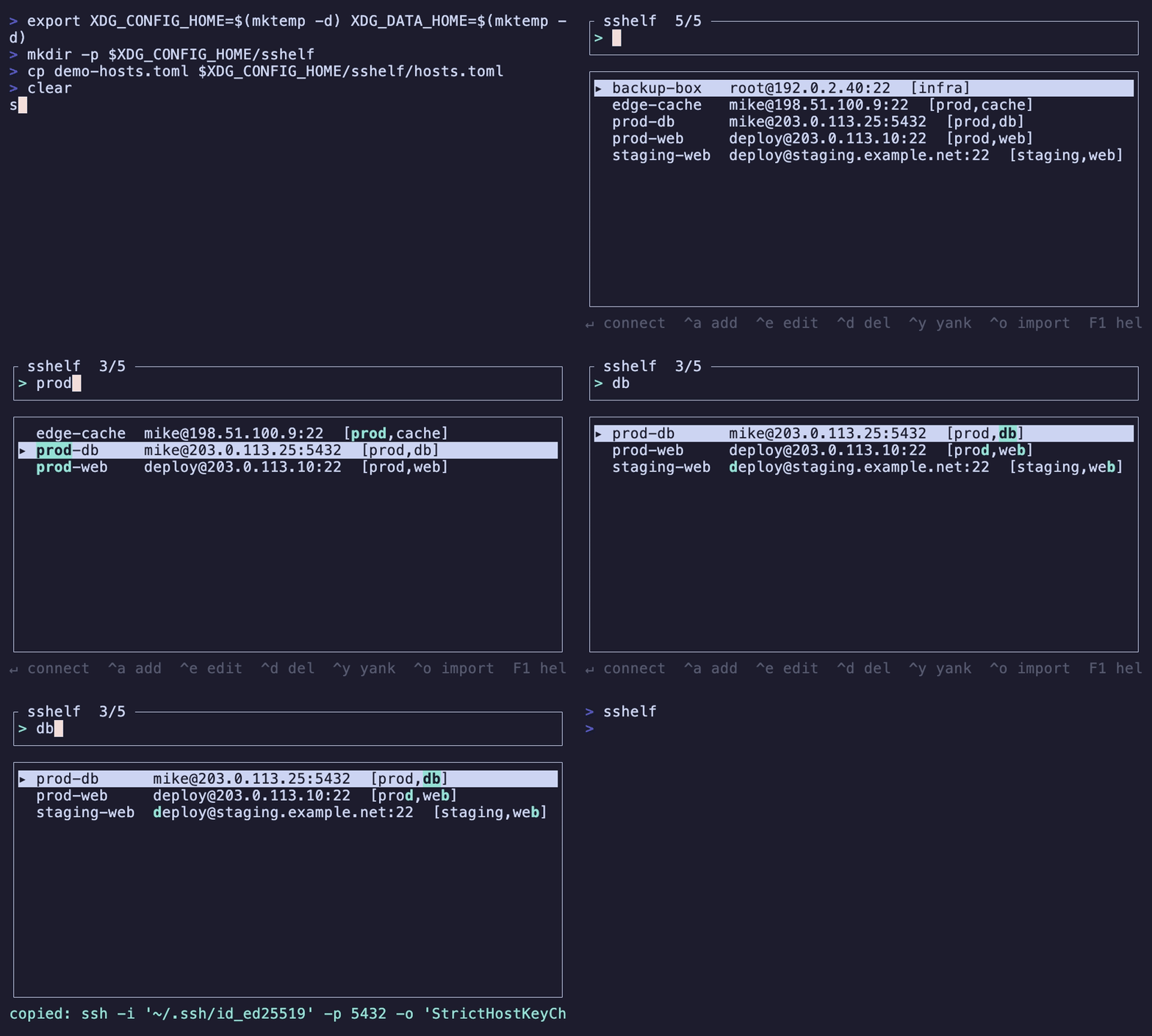
The interface is a fuzzy-searchable list of hosts. Type to filter, arrow-key to select, Enter to open the connection. Beyond that:
- Tag filtering — group hosts by environment, project, or anything else; filter to a tag before searching
- Jump host chains — define multi-hop paths; sshelf assembles the full
-Jflag sequence for you - Frecency sorting — hosts you connect to often and recently float to the top; you don't need to maintain a manual order
- Password autofill via SSH_ASKPASS — credentials stored in the OS keychain, retrieved transparently on connect 1
No AI dependencies. No cloud component. Pure Rust, runs entirely offline.
A real scenario
You're oncall. An alert fires at 11 PM. You need to get onto
prod-worker-03, then jump through bastion-us-east to reach a database node that's not directly reachable. The hostnames are long, the jump-host syntax is ssh -J bastion-us-east user@prod-db-internal-07, and you haven't touched that box in six weeks.Open sshelf. Type
prod-db. Two matches appear. The right one has a tag prod and frecency from the last incident puts it second in the filtered list. Select it, press Enter. sshelf assembles the full jump-host chain and opens the connection. You're in within ten seconds of the alert. 1The scenario also works in the other direction — if you're spinning down a project and want to remove a dozen stale hosts from your inventory, you do it in sshelf without touching the config file that your Ansible playbooks depend on.
Demo
Install
Four paths, pick one:
Homebrew (macOS and Linux, fastest):
brew install max-rh/tap/sshelfShell script (pre-built binary, no Homebrew required):
curl -fsSL https://raw.githubusercontent.com/max-rh/sshelf/master/install.sh | bashDebian/Ubuntu (
.deb package):Cargo (build from source, requires Rust 1.88+):
cargo install --git https://github.com/max-rh/sshelfPre-built binaries cover macOS (x86_64 + ARM64) and Linux (x86_64 + ARM64). No Windows binary yet, though a source build via
cargo works on Windows. 3Momentum
33 stars as of June 13 — up from 25 the day before, +8 in 24 hours. 1 The Reddit post on r/tui (18k subscribers) pulled 77 upvotes. 2
Community contributor BeneficialBig8372 submitted two PRs on June 12 — the kind of early external contribution that rarely happens before a project has found its audience. max-rh confirmed on June 13 they'd be merged: "Thanks alot for the contribution, I liked it. Left you a comment; will merge it afterwards 😄" 2
Loading stats card…
Caveats
- 9 commits, v0.2.0. The tool is new. The core feature set works cleanly, but expect rough edges in edge-case host configurations. File issues — the author is clearly active.
- No
~/.ssh/configimport. If you have 80 hosts already defined in your config, you'll add them to sshelf manually. There's no bulk-import from an existing config file (yet). - Source builds need Rust 1.88+. The Homebrew formula and pre-built binaries sidestep this entirely; it only matters if you're building from source on an older toolchain.
- No team/shared inventory yet. max-rh mentioned considering optional shared host lists with access control for teams, but that's a future direction, not a current feature. For now this is a single-user tool. 2
Install:
brew install max-rh/tap/sshelfCover image: from the sshelf GitHub README
More from this channel
- purple: manage your SSH fleet from the terminal
- clin: your Obsidian vault, terminal-native
- jj-gh: manage GitHub PRs from the terminal, the jj way
- dupehound: catch the code your AI wrote twice
- lazymongo: the MongoDB TUI that keeps you in the terminal
- syswatch: one TUI to replace htop, btop, and nvitop
- redthread: a corkboard and sticky notes for your terminal
- dskditto: parallel duplicate finder with fuzzy matching
Related content
- Sign in to comment.